Yes, a WooCommerce Store Can Be Fast: 100 on Mobile Without a Page Builder
By Spencer Taylor ·
If you want an online store that loads fast on a phone, looks sharp, and still runs on WooCommerce, you don't have to choose. I just launched one that proves it.
EC Cam Tools sells a single product: a hand lever that opens stuck camlock hose couplings, made by Ed Werry and Curt McDonald. Their buyers include truck drivers, operators, and fleet managers, among others, and most of them find the site on a phone. I handled the web design and the store from start to finish, and the site had to be fast on a phone, on a slow connection, before anything else.
The result
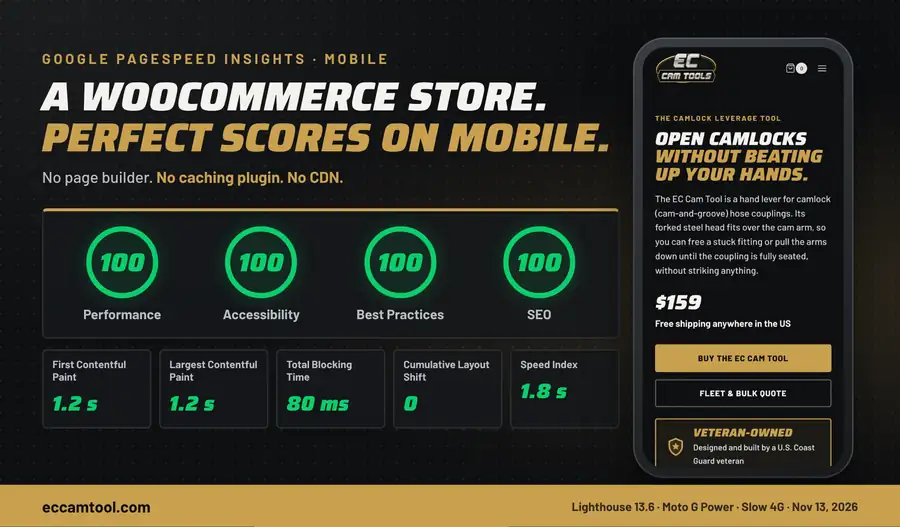
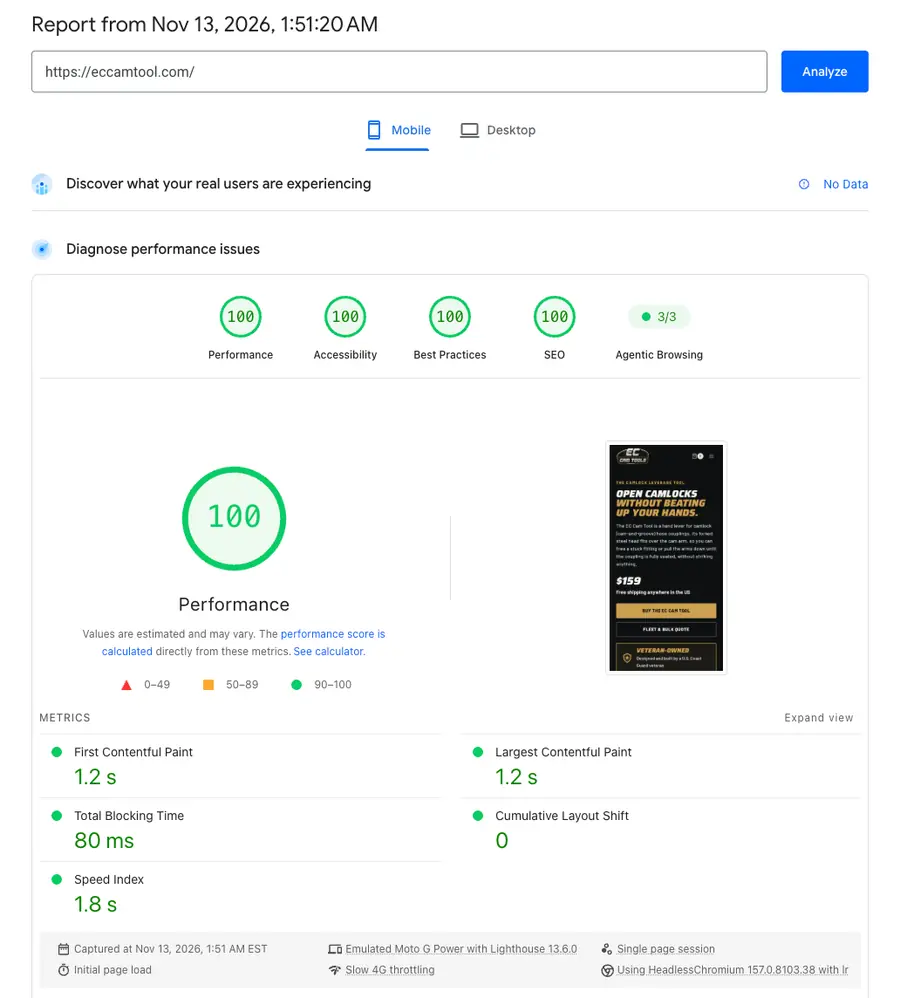
On November 13, 2026, I tested the homepage with Google PageSpeed Insights on mobile. It scored 100 in all four categories: Performance, Accessibility, Best Practices, and SEO.
The main content shows up in 1.2 seconds.
The page responds almost immediately when you tap it.
Nothing jumps around while it loads.
Google runs this test on a simulated mid-range phone with slow 4G, so it's a tough test, not an easy one.
Here's the part I like most: the site has no caching plugin and isn't behind a CDN yet. Those are usually the first things people add to speed up a slow site. This one scores 100 without them.
WooCommerce isn't what makes stores slow
WooCommerce gets blamed for slow stores, but most of the weight comes from what's stacked on top of it:
A page builder that loads its whole toolkit on every page.
Payment buttons, chat widgets, and tracking scripts loading where nobody needs them.
Photos uploaded at full size and shown to phones that need a fraction of that.
What I did differently
When I build e-commerce stores, I let WooCommerce do what it's good at, the cart, checkout, orders, and payments, and I build everything else by hand.
No page builder. The homepage, product page, and the other main pages are custom templates, hand-coded and built to work with the Kadence theme. Each page loads only what it needs.
Images sized for the screen. Every photo is a modern, lightweight format, and a phone gets a phone-sized version instead of the original.
Fonts hosted on the site. The fonts come from the store's own server, so the page doesn't have to wait on Google to draw the text.
Payment scripts only where you pay. Apple Pay and Google Pay load in the cart and at checkout, not on the product page.
The product page is the proof
The homepage is the headline, but the product page tells the better story. It started at 56 on mobile:
56 to 79: I found that the site was saving every resized image at full quality, which made them several times heavier than they needed to be. I capped the quality, and the score jumped.
79 to 89: The Apple Pay and Google Pay buttons were loading about 4 MB of scripts on the product page alone. I moved them to the cart and checkout, where buyers actually use them.
89 to 94: I set up every image to serve the right size for the screen it's shown on.
None of those fixes are exotic, and none of them needed a plugin. They came from looking at what the page was loading and asking whether it needed to be there. It's the same process I use for WordPress speed optimization on existing sites.
The hosting matters too
EC Cam Tools runs on my hosting: a private server with fast NVMe storage and the LiteSpeed web server, with 90 days of backups and security built in. A clean build on a server that isn't shared with thousands of other sites gives you a fast starting point. Cloudflare is included with my hosting, and I haven't turned it on for this site yet. There's still room to go faster.
What this means for your store
A lab score isn't the same as real sales, and checkout will always do more work than a homepage. But speed is one of the few things you fully control. A fast page keeps impatient buyers from leaving, it's easier for Google to rank, and it's easier for everyone to use, including people on old phones and weak signals.
If your store feels slow, better hosting alone usually won't fix it. Good hosting plus a better build will.
About the Author
Spencer Taylor
South Jersey–based web designer and developer, and the person behind Threshold Solutions. I build fast, custom websites for small businesses and agencies across New Jersey, Philadelphia, and beyond — and share what I learn here.
Looking at other business websites is the fastest way to figure out what you want from yours. These are six small business websites I designed and built, what each one had to do, and the design choices that make it work.
Wix and Squarespace make it easy to start a website. Leaving is a different story. Here is what comes with you when you move, what has to be rebuilt, and how to keep the Google rankings you've earned.
Most comparisons of Shopify and WooCommerce line up features. The features are close enough that they rarely decide anything. The better question is who owns the store, what it costs you every month, and what happens if you ever want to leave.