


Color contrast
Text has to stand out clearly from its background, including light gray text, text over photos, and buttons. If your site has a dark mode, I check both.
Your website should work for every visitor. I find where it becomes challenging for them and fix it. That includes visitors who use:
I review your site page by page against industry best practices for accessibility. Automated tools catch the obvious problems, then I check the rest by hand, because many issues only show up when a person uses the site. Here is what I look at:
Text has to stand out clearly from its background, including light gray text, text over photos, and buttons. If your site has a dark mode, I check both.

Every link, button, menu, and form has to work with the Tab and Enter keys alone, in a sensible order, with a visible outline showing where you are.

Every field needs a label a screen reader can announce, and errors need to say what went wrong. A screen reader is software that reads the page aloud for people who can't see it.

Each page needs one main heading and a logical outline underneath it. Screen reader users jump between headings the way sighted visitors skim.

Alt text is a short written description of an image. Images that carry meaning need one, and decorative images need to be marked so they are skipped.

"Click here" tells a screen reader user nothing. Each link should say where it goes.
My target is a 100% accessibility score in Google PageSpeed Insights on every page, verified before the work is done. You get a plain-English list of what I found, what I fixed, and anything that needs a decision from you.
Overlay widgets do not make a site accessible or allow it to pass accessibility tests. An overlay is a script that adds an accessibility toolbar or icon on top of your website, which must be activated by the user and doesn’t change the underlying code, so the problems remain. These widgets can even interfere with the tools people with disabilities already use.
I fix the site itself: colors in the stylesheet, labels on form fields, heading order, alt text, and menus that work from the keyboard. The fixes stay in place after I leave, and nothing extra loads on your pages.
I'm a web developer, not a lawyer. I don't certify sites, and I can't promise that an audit or a set of fixes will protect you from a legal claim. If you have received a demand letter or have legal questions, talk to an attorney.
What I can promise is work you can check yourself: fixes made to industry best practices for accessibility, a 100% accessibility score in PageSpeed Insights on every page I fix, and a written record of what changed.
Accessibility also needs upkeep. A new image without alt text or a new plugin with an unlabeled form can undo good work. A Webcare plan keeps someone watching the site after the fixes are in.
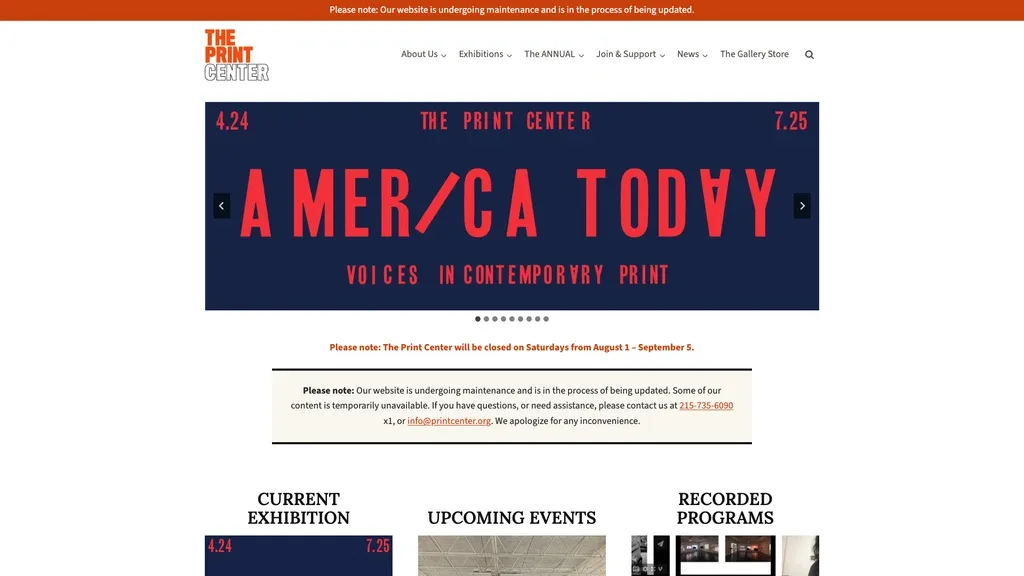
When I rebuilt The Print Center's website after it was hacked, the new site scored 100 for accessibility at launch. I rebuilt my own site as static HTML with color contrast checked in light and dark mode before any page was laid out, and its main pages score 100 for accessibility in PageSpeed Insights. The static website case study has those numbers.
My accessibility statement explains how I handle accessibility on spencer-taylor.com and how to report a problem.
I can't promise that, and I'd be cautious of anyone who does. I fix sites to industry best practices for accessibility, with a 100% accessibility score in PageSpeed Insights as the measurable target. For legal advice, talk to an attorney.
A widget sits on top of the site and leaves the problems in the code. I fix the code, so the site works with the tools your visitors already use.
No. Automated tests catch many problems, but not all of them, which is why I also check keyboard use, forms, and reading order by hand. The score is the floor, not the finish line.
Usually only a little. The most visible changes are stronger color contrast and clear focus outlines. Most fixes are in the code and invisible to sighted visitors.
Accessibility work is billed by the hour, like everything I do. I review your site first and give you an hours estimate before I start. I track time in 15-minute increments and bill only for real work.
Hours come in prepaid blocks: 5 hours for $500, 10 hours for $900, or 20 hours for $1,700, and they never expire. No commitments, no contracts, no gotchas. See my rates for details.
If you want to know where your site stands, send me the address. I'll tell you what an audit would cover and what it would take.

Spencer Taylor
Web designer & developer
Mount Laurel, New Jersey