

How Much Does a Small Business Website Cost in 2026?
What actually drives the price of a small business website, how many hours typical sites take, the costs that continue after launch, and how to compare quotes.
Read the article
My own website has run on Divi for as long as Divi has had a version number worth mentioning: Divi 3, then 4, then Divi 5. It was a good showcase for the work I do for clients, and Divi 5 is still a tool I recommend and build with. But my site had become the one project I never had time for. Every visit to the dashboard was a reminder: 24 active plugins, a page builder generating CSS at request time, security hardening layered on security hardening, and a performance score I had spent a ten-hour session dragging from 78 to 88.
In October 2026 I replaced it with plain HTML and CSS. No WordPress, no database, no page builder, no plugins. Every page is a file. This is what I did, what it measurably changed, and why it would be the wrong move for many of the businesses I work with.
All performance figures in this case study are from Google PageSpeed Insights, mobile.
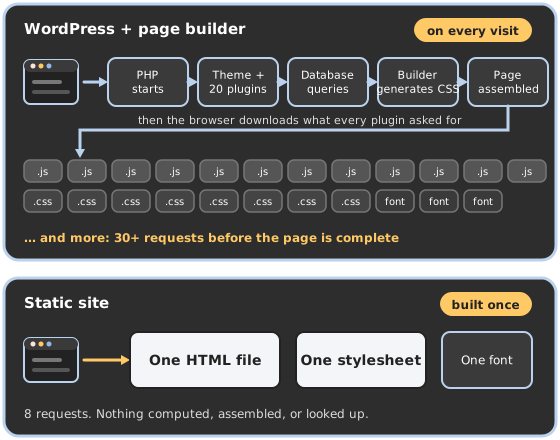
A static website is finished before anyone asks for it. Every page is an HTML file sitting on the server, with one stylesheet for the whole site. When a visitor arrives, the server hands over the file. Nothing is computed, assembled, or looked up.
A WordPress site with a page builder works the other way around. Every page is built on demand: PHP starts, loads the theme and every active plugin, queries the database for the content and the builder's layout settings, generates the CSS for that layout, assembles the HTML, and sends it — along with the scripts and stylesheets each plugin asks the browser to load. Caching can hide most of that work from the server, but the browser still receives everything the builder and the plugins put in the page.
Both approaches produce a web page. One produces it once, when I build it. The other produces it on every request.
The trigger was a redesign. I wanted a lighter, more consistent design, and I was weighing a custom theme against a code-only build. When I listed what my site actually needs to do, the list was short: show the work, explain the services, let me add pages and articles quickly, take a contact form, and load fast on a phone in a parking lot. Nothing on that list needs a CMS — and the one that mattered most to me, adding content quickly, is the one a static framework does best.
That is the part people miss about static sites. I did not move to one because my site rarely changes. I moved to one because I want to change it more: new service pages, new case studies, new articles, built from a reusable set of components by me and my AI assistant (I use and recommend Claude) in minutes instead of an afternoon in a page builder. A static site is perfect for a single author who wants as many pages and posts as they like. What it is not built for is many authors, editorial workflows, and layers of approval — more on that below.
Three reasons, then, in order: content velocity — I want to add pages and articles faster than a page builder lets me; performance — scores I never have to think about; and time — I do not have ten hours to spend optimizing my own website again. A static site is fast by nature, not by effort.
So the plan became: keep every URL, port every word of copy, rebuild the design once as a small stylesheet, and generate the pages with a 150-line build script. Launch only after I had reviewed every page on staging.
I want to be fair to Divi, because I am a Divi specialist and I build client sites on Divi 5 every month. It is a powerful, extensible builder with a genuinely good visual editor, a theme builder, and a module ecosystem that fits a great many projects. For a client who wants to edit their own pages, it is one of the best tools there is.
For my site, four things worked against it:
.htaccess. Posts and category pages come from a second script. Deploy is one command.Google PageSpeed Insights, mobile. Divi figures are from my own records (April 2026); the CLS numbers are the steady state — Divi 5 regenerates its static CSS cache after a purge, and the score looks good for a few minutes before the shift comes back. Static figures were measured on the live site on October 6, 2026.
| Divi 5, as it was | Divi 5 after a 10-hour tuning session | Static | |
|---|---|---|---|
| Home page — Performance | 78 | 88 | 98–100 |
| Home page — CLS | 0.67 steady state | 0.016 right after a static-cache purge; back to ~0.67 within minutes | 0 |
| Web design page — Performance | 76 | 81 | 98–100 |
| Web design page — CLS | 0.58–0.67 | 0.01 right after a purge, then back up | 0 |
| Accessibility · Best Practices · SEO | 100 on almost every page | same | 100 · 100 · 100 |
| Largest Contentful Paint, home | — | — | 1.35–1.4 s |
| Requests to load the home page | dozens: Divi core, module scripts, icon font, extension scripts, analytics | fewer | 8 |
| Transfer size, home page | about 1.3 MB | similar | about 140 KB compressed, half of it the one web font |
| Plugins to update | 24 | 24 | 0 |
| Login page, XML-RPC, REST API, cron | all exposed, all hardened | same | none exist (they return 404) |
| Database | MySQL, queried on every uncached request | same | none |
| Server work per page view | PHP + database, or a cache hit | same | read one file |
Speed is structural, not configured. There is no cache to warm, no cache to purge, no optimization plugin fighting another plugin. A page is a file; LiteSpeed sends it. That is why the scores are 98–100 without any of the tuning I do on WordPress sites — the ten-hour session above bought ten points; the static build gave the rest for free.
Zero layout shift, by design. Every image has its real width and height in the HTML, every SVG included. The header is one element with one layout. Nothing waits for a script to settle. CLS is not something I fixed; it is something that cannot happen.
Security by absence. Most WordPress attacks go after the login page, XML-RPC, outdated plugins, or the database. This site has none of those — there is no login and no account to hack, because there is nothing to log in to. The attack surface is a web server serving files and one form handler I wrote and can read in full. I still keep the server hardened — but I am no longer patching software weekly to protect a brochure site.
Consistency came free. When every component is defined once in a stylesheet, every page gets the same buttons, the same spacing, the same dark mode. On the Divi site, consistency was a discipline I had to maintain across 37 pages of builder settings. Here it is a property of the system.
Building out is fast — and that was the point. A new page is a file with a meta block and HTML that uses the existing components. The build script handles the chrome, the sitemap, and the cache headers. I added a Reviews page, a FAQs page, and a filterable blog during the rebuild because each one took minutes. This case study and the new service page it links to were built the same way.
It costs the server almost nothing. Serving a file is the cheapest thing a web server does. The site shares a VPS with client sites and is now effectively invisible in the resource graphs — no PHP workers, no database connections, no cron.
Editing it is a conversation. I built and launched this site in two days working with an AI assistant (I use and recommend Claude), and that is how it is maintained. A text change takes seconds. A new section, a new page, a new case study: I describe what I want and it is built from the same components as everything else — no builder settings to dig through, no plugin to configure. Plain HTML and CSS are the most legible format a model can work in, so every change is a diff I can read, check at five screen widths in both color modes, and deploy with one command. The same is true for a client who works with an AI assistant: you get more flexibility than a page builder gives you, not less, because nothing on the page is off-limits.
I am a WordPress developer. I still build, host, and maintain WordPress sites for clients every week, and I will keep doing that, because many businesses need things a static site does not do well:
For my own site — one author, content I control, a form, and as many pages and articles as I want to add — none of those applied. The trade I made was giving up a dashboard I rarely opened in exchange for a site that is faster, safer, and cheaper to run than anything I could have built on a CMS — and easier to change, not harder.
The old WordPress install is parked on the server as a rollback for a while, then it goes away. The staging copy stays as a test bed. New articles and pages get written as files. And when I quote a static build for a client now, I can point at the one I use myself.

About the Author
South Jersey–based web designer and developer, and the person behind Threshold Solutions. I build fast, custom websites for small businesses and agencies across New Jersey, Philadelphia, and beyond — and share what I learn here.
Work with meIf your site is a showcase and a contact point rather than a shop or a publication, a static build may be the fastest, safest site you will ever own. I will tell you plainly if it is not the right fit.
What actually drives the price of a small business website, how many hours typical sites take, the costs that continue after launch, and how to compare quotes.
Read the articleMost of what matters when you hire someone to make a website isn't visible until months after launch. The questions to ask first, and the red flags to walk away from.
Read the articleA business can't delete a review on its own Google Business Profile. Here's when Google will remove one, how to report it, and what actually works instead.
Read the article